

Latest Version
JakobDev
Security
Linux
Free
page.codeberg.JakobDev.jdPermissionStoreEdit
Report a Problem
More About jdPermissionStoreEdit
A Hands-On Look at Flatpak Permission Debugging
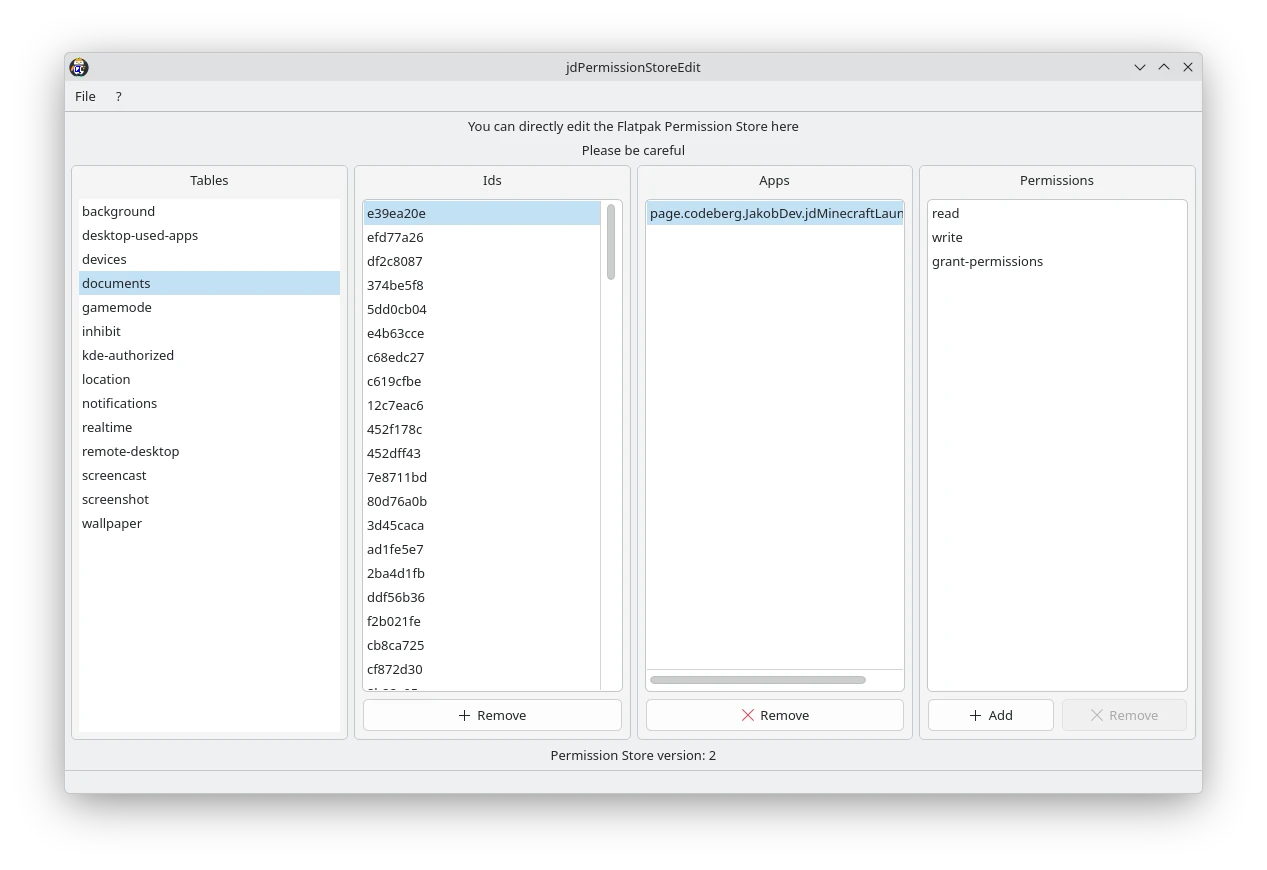
Working with Flatpak sandboxing can sometimes feel like peering into a black box, especially when you are building tools to manage application permissions. Enter jdPermissionStoreEdit Flatpak editor, a highly specialized utility developed by JakobDev. Instead of wrestling with command-line queries or writing custom scripts just to verify how your software interacts with the permission store, this tool provides a direct, structured interface to view and modify those backend entries.
Using the app is a straightforward experience. Once launched on your Linux system, it hooks directly into the Flatpak Permission Store, displaying the active rules and overrides. For developers, this means you can instantly simulate different permission states, modify variables on the fly, and observe how your target application behaves under various security profiles without leaving your testing environment.
Key Features of the jdPermissionStoreEdit Flatpak Editor
- Direct Store Access: Read and write directly to the Flatpak Permission Store database without intermediate layers.
- Streamlined Debugging: Ideal for verifying the behavior of permission-management applications during active development cycles.
- Focused Linux Integration: Built specifically for the Linux desktop environment, aligning perfectly with standard Flatpak architectures.
- No-Nonsense Interface: A clean layout designed entirely around data visibility and quick editing, keeping distraction to a minimum.
Who Is This Tool For?
It is crucial to emphasize that the jdPermissionStoreEdit Flatpak editor is not a consumer-grade app manager. This program is built exclusively for software developers and system administrators who understand the inner workings of Flatpak's sandboxing mechanism. Incorrect modifications to your permission store can cause installed Flatpak applications to behave unexpectedly, so a solid grasp of Linux security frameworks is highly recommended before making live changes.
An Essential Addition to the Developer Toolkit
If you are currently developing software that interacts with system permissions, or if you are building an alternative Flatpak frontend, having a dedicated inspector like this saves valuable development hours. It eliminates the guesswork of backend state validation, giving you a clear, real-time window into your system's configuration.
To explore this utility further and integrate it into your development environment, head over to the official Flathub store page to learn more about its implementation and setup.
Rate the App
User Reviews

Popular Apps










Editor's Choice